Patterns for building console games in C
I dove into the C programming language to develop an object-oriented game in the terminal.
· 7 min read
Eceman is an arcade console game developed during the Algorithm and C Programming course. It was made for Windows and was inspired by Club Penguin Thin Ice.
Check the project on GitHub.
Purpose
The main goal of this project was to go back to basics in C:
- Loops
- Arrays
- Structures
- Pointers
- Files
Those were topics I was already familiar with, so I decided to dive into advanced C patterns: building a graphical interface for the terminal and managing entity behaviors.
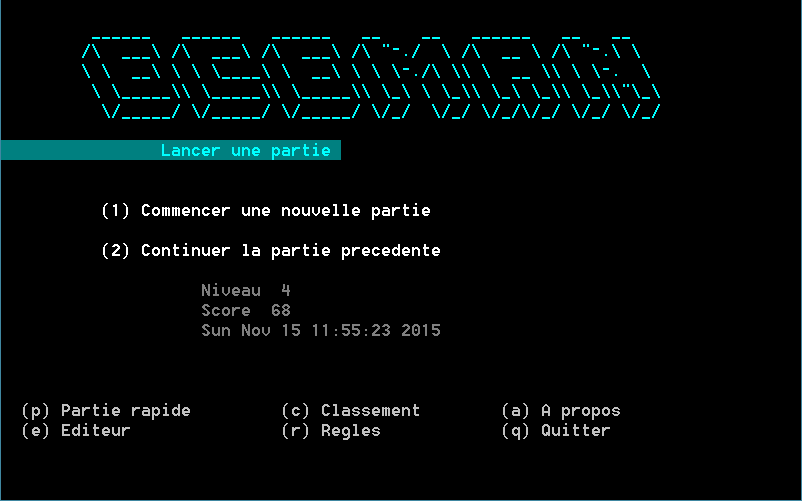
Definition
Rules
The player must control the main character -- Eceman -- through a maze covered in ice. Ice squares melt as soon as Eceman walks on them. The more ice squares it passes over, the better the score gets. Its goal is to get through the door that leads to the next level.
However, the difficulty increases progressively: holes make him fall back to the previous level, enemies roam the maze, etc.
Game board
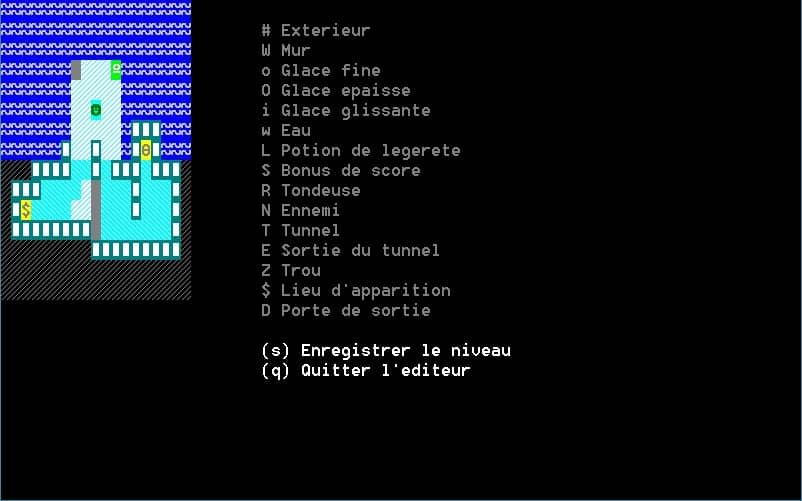
The board is a two-dimensional matrix (15 * 19) of characters generated by a map file.
wwwwwwwwwwwwwwwwwww
wwwwwwwwwwwwwwwwwww
wwwwwwwwwwwwwwwwwww
wwwwwwwZiiiSwwwwwww
wwwwwwwiiiiiwwwwwww
wwwwwwwiiNiiwwwwwww
wwwwwwwiiiiiwWWWwww
wwwwwwWiiWiiwWDWwww
###WWWWooWoWWWoWWW#
#WWWooooiZoooWoooW#
#W$ooooiiZoooWoooW#
#WWWWWWWWZoooooooW#
#########WWWWWWWWW#
###################
###################
Different squares
The level's grid uses one character per square. Here are the different types of square:
- Thin ice. Breaks after Eceman walks on it.
- Thick ice. Breaks after Eceman walks on it twice.
- Slippy ice. Drags Eceman up to an obstacle.
- Water. State after the thin ice.
- Lightness potion. Makes ices unbreakable until next level.
- Score bonus. You obtain 10 points.
- Tunnel. Teleports Eceman to the tunnel exit.
- Hole. Teleports Eceman to the previous level at the same square.
- Spawn. Spawn point.
- Exit door. Leads to the next level (end of the game if not).
- Wall. No way to go through.
- Outside. Inaccessible squares.
Entities
In addition to these squares, there are some interactive entities:
- Mower. Once touched, mows the path and breaks the ice.
- Enemy. The living character that moves. Once touched, you restart the level and lose some points.
- Eceman. Yourself.
Coding the game
Structuring the code
When I first heard that I had to develop a game in C, I was wondering how I could write it in a maintainable way. To me, that meant replicating the concepts of Object-Oriented Programming.
The tricks I learned from reading Linux code on GitHub were to:
- Use
staticas often as I could when a function is private. - Use
constas often as I could when I wasn't supposed to change a value.
Structures are in a way the ancestors of classes. I then tried to use them a lot to implement polymorphism.
Managing the entities
A mower and an enemy are very similar in some ways. Their behaviors differ only when they hit an object, and they reach their final state on different events.
- A mower
- moves only when Eceman pushes it;
- stops once it hits a wall or any other obstacle.
- An enemy
- moves from the start;
- stops once it hits Eceman.
I focused a lot on avoiding code redundancy. After a lot of Googling about using Design Patterns in C, I landed on an article[^1] by Adam Petersen.
It turned out I had to use function pointers to simulate the Strategy Pattern. I had never used this functionality before, so I got to try it!
I first needed to define some function pointers for each strategy.
/**
 * Gets the collide condition of the entity with a given object.
 * @param symbol The object to try the collision with
 * @param pos The position of the hero
 * @return 1 if collision, 0 otherwise
 */
typedef int (*CollidePropertyStrategy) (const char symbol, const Position* pos);

/**
 * Execute the action of the entity when it collides an object.
 * @param entity The entity we want to change the behavior of
 * @param direction The entity's new direction
 */
typedef void (*CollideStrategy) (Entity* entity, const enum Direction direction);

/**
 * Runs the entity action once moved.
 * @param game The current game state
 * @param hero The hero
 * @param entity The given entity with new positions
 * @param board The game board with objects
 */
typedef void (*FinalActionStrategy) (
  GameState* game,
  Eceman* hero,
  Entity* entity,
  char board[ROWS][COLS]
);
The Entity struct would then include these function pointers.
struct Entity {
  Position* pos;
  enum EntityState state;
  enum Direction direction;
  CollidePropertyStrategy collidePropertyStrategy;
  CollideStrategy collideStrategy;
  FinalActionStrategy finalActionStrategy;
};
We're going to specify one of these strategy functions: finalActionStrategy(). It describes the behavior of the entity at the end of a round:
- A mower gives the player a point and repaints the board.
- An enemy checks whether it has collided with the hero and launches an appropriate function.
void mowerFinalActionStrategy(
  GameState* game,
  Eceman* hero,
  Entity* mower,
  char board[ROWS][COLS]
) {
  game->levelScore++;

  drawEntity(board, mower);
}

void enemyFinalActionStrategy(
  GameState* game,
  Eceman* hero,
  Entity* enemy,
  char board[ROWS][COLS]
) {
  if (enemy->caseBelow == HERO_CHAR) {
    gotAttacked(game, board, hero);
  }
}
Now, to create a specific entity, we won't directly call the private createEntity() function but the public createMower() or createEnemy() functions.
static Entity* createEntity(
  const unsigned int x,
  const unsigned int y,
  const enum Direction direction,
  CollidePropertyStrategy collidePropertyStrategy,
  CollideStrategy collideStrategy,
  FinalActionStrategy finalActionStrategy
) {
    Position* pos = NULL;
    Entity* entity = NULL;

    pos = malloc(sizeof(Position));
    assert(pos != NULL);

    entity = malloc(sizeof(Entity));
    assert(entity != NULL);

    pos->x = x;
    pos->y = y;

    entity->pos = pos;
    entity->state = ACTIVE;
    entity->direction = direction;

    entity->collidePropertyStrategy = collidePropertyStrategy;
    entity->collideStrategy = collideStrategy;
    entity->finalActionStrategy = finalActionStrategy;

    return entity;
}

Entity* createEnemy(
  const unsigned int x,
  const unsigned int y,
  const enum Direction direction
) {
  return createEntity(x,
    y,
    direction,
    enemyCollidePropertyStrategy,
    enemyCollideStrategy,
    enemyFinalActionStrategy
  );
}

Entity* createMower(
  const unsigned int x,
  const unsigned int y
) {
  return createEntity(
    x,
    y,
    UP,
    mowerCollidePropertyStrategy,
    mowerCollideStrategy,
    mowerFinalActionStrategy
  );
}
This way, we don't have to worry about the strategies that our entity will trigger, it's already handled. Instead of having a bunch of switches, I just call my brand new functions that do the job for me:
if (
  entity->collidePropertyStrategy(
    board[entity->pos->x - 1][entity->pos->y],
    entity->pos
  )
) {
  entity->collideStrategy(entity, DOWN);

  return;
}
As you can see, I don't even need to know what kind of entity it is anymore. We can consider that as polymorphism.
Designing the terminal
I'm the kind of player that gets quickly bored when the game doesn't look attractive. It was very challenging to make it sexy, as it is a terminal game.
However, it is possible to add some foreground and background colors. As this game is built for Windows only, I wrote a little function to change the color of the output:
void setColor(const int color) {
  HANDLE  hterminal;
  hterminal = GetStdHandle(STD_OUTPUT_HANDLE);
  SetterminalTextAttribute(hterminal, color);
}
I combined this with another function getCaseColor() that returns the color of the object. It is now easier to print colors: setColor(getCaseColor(ENEMY_CHAR)).
Editing the levels
The whole point of the game is to create levels with new entities and objects. I therefore made it possible to create your own level right in the game.
You can see live changes when you type the character corresponding to the object. A kind of WYSIWYG (What You See Is What You Get)!
Conclusion
This game was programmed in an object-oriented way. Coding in C was not a good fit. It was part of the contract of the course, though.
I feel like I sometimes bent what C had to offer to get more out of it. The way I extended the properties of the entities with function pointers is quite odd in my opinion. Yet, I believe it's an elegant and appropriate way to handle it.
References
- adampetersen.se